

JH Series J Hooks
Efficient cable support starts with products that match the cable load, attachment point, and pathway design. Docs Industries’ JH Series J Hooks give contractors and engineers a practical way to support data, low-voltage, fiber optic, and innerduct cable runs with clean routing and dependable field flexibility.


J-Hook with ¼”-20 Eye Coupling
Doc’s® J-Hooks provide support for all data comm and low voltage cables The End Hook uses a female ¼”-20 eye coupling to directly attach to ¼”-20 male thread. Doc’s J-Hooks will support all types of data comm and low voltage cables, such as CAT 5, CAT 5e, CAT6, CAT 6a, CAT 6e, fiber optic, and innerduct.… Continue reading J-Hook with ¼”-20 Eye Coupling
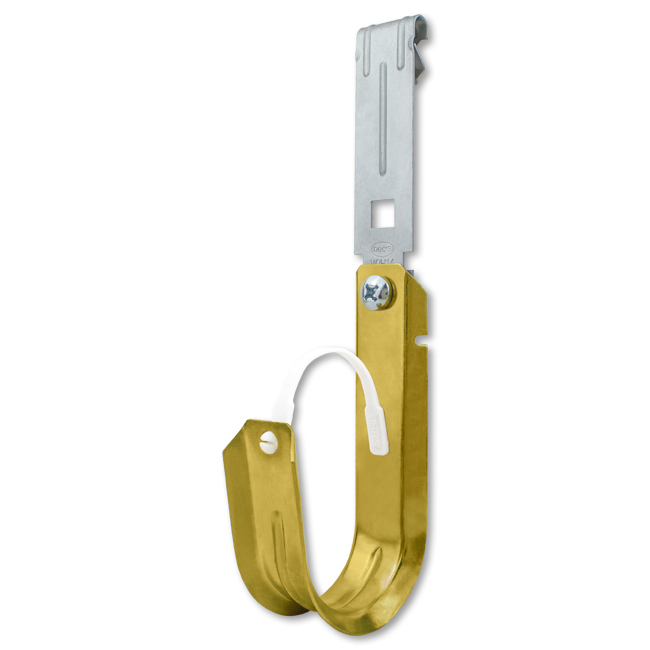
J Hook with Z Purlin Clip (1/8 – 1/4″)
Doc’s® J-Hooks provide support for all data comm and low voltage cables. The J-Hook includes a “Z” purlin clip that allows you to attach the hook to flanges 1/8” – 1/4″ thick. Product Code J-Hook Size Load Capacity Support Capacity JH-12ADOC14 3/4″ 17lbs Capacity to hold up to 16 4-Pair UTP CAT 5e or 2-strand… Continue reading J Hook with Z Purlin Clip (1/8 – 1/4″)

J Hook with C Purlin Clip (1/8 – 1/4″)
Doc’s® J-Hooks provide support for all data comm and low voltage cables. The J-Hook includes a “C” purlin clip that allows you to attach the hook to flanges 1/8” – 1/4″ thick. Product Code J-Hook Size Load Capacity Support Capacity JH-12VOH14 3/4″ 17lbs Capacity to hold up to 16 4-Pair UTP CAT 5e or 2-strand… Continue reading J Hook with C Purlin Clip (1/8 – 1/4″)

J-Hook with Angle Clip & Spring Steel Beam Clamp
Product Code J-Hook Size Load Capacity Support Capacity JH12ACSSBC 3/4″ 17lbs Capacity to hold up to 16 4-Pair UTP CAT 5e or 2-strand fiber optic cables; or up to 10 CAT 6 cables. JH21ACSSBC 1 5/16″ 17lbs Capacity to hold up to 50 4-Pair UTP CAT 5e or 2-strand fiber optic cables; or up to… Continue reading J-Hook with Angle Clip & Spring Steel Beam Clamp

J-Hook with Spring Steel Beam Clamp
Product Code J-Hook Size Load Capacity Support Capacity JH12SSBC 3/4″ 17lbs Capacity to hold up to 16 4-Pair UTP CAT 5e or 2-strand fiber optic cables; or up to 10 CAT 6 cables. JH21SSBC 1 5/16″ 17lbs Capacity to hold up to 50 4-Pair UTP CAT 5e or 2-strand fiber optic cables; or up to… Continue reading J-Hook with Spring Steel Beam Clamp

J-Hook with Angle Clip and Rotating Press Beam Clamp
Doc’s® J-Hooks provide support for all data comm and low voltage cables. The J-Hook includes a 90° angle clip with screw in press beam clamp for flanges up to 1/2” thick. Rotates 360° Product Code J-Hook Size Load Capacity Support Capacity JH-12ACPBC 3/4″ 17lbs Capacity to hold up to 16 4-Pair UTP CAT 5e or… Continue reading J-Hook with Angle Clip and Rotating Press Beam Clamp

J-Hook with Press Beam Clamp
Doc’s® J-Hooks provide support for all data comm and low voltage cables. The J-Hook includes a screw in press beam clamp for flanges up to ½” thick. Product Code J-Hook Size Load Capacity Support Capacity JH-12PBC 3/4″ 17lbs Capacity to hold up to 16 4-Pair UTP CAT 5e or 2-strand fiber optic cables; or up… Continue reading J-Hook with Press Beam Clamp

J-Hook, Angle Clip & Steel Beam Clamp (5/16 x 1/2″)
Doc’s J-Hooks provide support for all data comm and low voltage cables. The J-Hook with Angle Clip & FM58 Steel Beam Clamp includes a spring steel knock-on beam clamp that allows you to attach the hook to flanges 5/16” – 1/2″ thick. Product Code J-Hook Size Load Capacity Support Capacity JH-12ACFM58 3/4″ 17lbs Capacity to hold… Continue reading J-Hook, Angle Clip & Steel Beam Clamp (5/16 x 1/2″)

J-Hook, Angle Clip & Steel Beam Clamp (1/8 x 1/4″)
Doc’s® J-Hooks provide support for all data comm and low voltage cables. The J-Hook with Angle Clip & FM24 Steel Beam Clamp includes a spring steel knock-on beam clamp that allows you to attach the hook to flanges 1/8” – 1/4″ thick. Product Code J-Hook Size Load Capacity Support Capacity JH-12ACFM24 3/4″ 17lbs Capacity to… Continue reading J-Hook, Angle Clip & Steel Beam Clamp (1/8 x 1/4″)

J-Hook, Knock On Steel Beam Clamp (5/16 x 1/2″)
Doc’s® J-Hooks provide support for all data comm and low voltage cables. The J-Hook includes a spring steel knock-on beam clamp that allows you to attach the hook to flanges 5/16” – 1/2″ thick. Product Code J-Hook Size Load Capacity Support Capacity JH-12HOK58 3/4″ 17lbs Capacity to hold up to 16 4-Pair UTP CAT 5e… Continue reading J-Hook, Knock On Steel Beam Clamp (5/16 x 1/2″)

J-Hook with Knock-on Beam Clamp for Flanges 1/8 – 1/4″ Thick
Doc’s® J-Hooks provide support for all data comm and low voltage cables. The J-Hook includes a spring steel knock-on beam clamp that allows you to attach the hook to flanges 1/8” – 1/4″ thick. Product Code J-Hook Size Load Capacity Support Capacity JH-12HOK24 3/4″ 17lbs Capacity to hold up to 16 4-Pair UTP CAT 5e… Continue reading J-Hook with Knock-on Beam Clamp for Flanges 1/8 – 1/4″ Thick

J-Hook with Bat Wing Clip
Doc’s® J-Hooks provide support for all data comm and low voltage cables. The J-Hook includes a spring steel Bat Wing clip that allows you to attach the hook to 12 gauge wire or threaded rod up to 1/4” in diameter. Product Code J-Hook Size Load Capacity Support Capacity JH-12W 3/4″ 17lbs Capacity to hold up… Continue reading J-Hook with Bat Wing Clip

J-Hook with Angle Clip and Pin for Concrete
Doc’s® J-Hooks provide support for all data comm and low voltage cables. The J-Hook includes a 90° angle clip with powder actuated pin for concrete. Product Code J-Hook Size Load Capacity Support Capacity JH-12ACPA 3/4″ 17lbs Capacity to hold up to 16 4-Pair UTP CAT 5e or 2-strand fiber optic cables; or up to 10… Continue reading J-Hook with Angle Clip and Pin for Concrete

J-Hook with 90° Angle Clip (3/8″ Hole)
Doc’s® J-Hooks provide support for all data comm and low voltage cables. The J-Hook includes a 90° Angle Clip attachment. The hole of clip is designed to work with 3/8″ threaded rod. Product Code J-Hook Size Load Capacity Support Capacity JH-21AC6 1 5/16″ 17lbs Capacity to hold up to 50 4-Pair UTP CAT 5e or… Continue reading J-Hook with 90° Angle Clip (3/8″ Hole)

J Hook with 90° Angle Clip
Doc’s® J-Hooks provide support for all data comm and low voltage cables. The J-Hook includes a 90° angle clip with 1/4″ hole. Product Code J-Hook Size Load Capacity Support Capacity JH-12AC 3/4″ 17lbs Capacity to hold up to 16 4-Pair UTP CAT 5e or 2-strand fiber optic cables; or up to 10 CAT 6 cables.… Continue reading J Hook with 90° Angle Clip

Standard 4″ J-Hook
Doc’s® J-Hooks provide support for all data comm and low voltage cables 4” Doc’s® J-Hooks can hold up to 300 4-Pair UTP CAT 5e or 2-strand fiber optic cables; or up to 220 CAT 6 cables. Doc’s® J-Hooks will support all types of data comm and low voltage cables, such as CAT 5, CAT… Continue reading Standard 4″ J-Hook
Standard 2″ J-Hook
Doc’s® J-Hooks provide support for all data comm and low voltage cables 2” Doc’s® J-Hooks can hold up to 80 4-Pair UTP CAT 5e or 2-strand fiber optic cables; or up to 10 CAT 6 cables. Doc’s® J-Hooks will support all types of data comm and low voltage cables, such as CAT 5, CAT 5e,… Continue reading Standard 2″ J-Hook

Standard 1 5/16″ J-Hook
Doc’s® J-Hooks provide support for all data comm and low voltage cables 1 5/16″ Doc’s® J-Hooks can hold up to 50 4-Pair UTP CAT 5e or 2-strand fiber optic cables; or up to 32 CAT 6 cables. Doc’s® J-Hooks will support all types of data comm and low voltage cables, such as CAT 5, CAT… Continue reading Standard 1 5/16″ J-Hook

Standard 3/4″ J-Hook
Doc’s® J-Hooks provide support for all data comm and low voltage cables 3/4″ Doc’s® J-Hooks can hold up to 16 4-Pair UTP CAT 5e or 2-strand fiber optic cables; or up to 10 CAT 6 cables. Doc’s J-Hooks will support all types of data comm and low voltage cables, such as CAT 5, CAT 5e, CAT6, CAT 6a,… Continue reading Standard 3/4″ J-Hook
JH Series J Hooks for Organized Cable Pathways
The JH Series J Hooks by Docs Industries help contractors create clean, reliable cable pathways across commercial, industrial, and institutional projects. With multiple hook sizes and mounting configurations, the JH Series supports everything from small branch routes to larger cable bundles above ceilings, along framing, and through service areas.
This article is for contractors, structural engineers, low-voltage installers, and project managers who need a flexible support system for organized overhead cable management.
What Are JH Series J Hooks?
JH Series J Hooks are cable support products designed for data communication and low-voltage cable pathways. They help installers route cable bundles without relying on full cable tray systems in every area.
Docs Industries’ JH Series supports cable types such as:
- CAT 5
- CAT 5e
- CAT 6
- CAT 6A
- CAT 6E
- Fiber optic cable
- Innerduct
- General data comm and low-voltage cable
The series includes standard J Hook sizes along with multiple attachment styles. These options allow contractors to match the support method to the structure, whether the route connects to beam flanges, threaded rod, ceiling wire, concrete, purlins, or horizontal surfaces.
In practical terms, JH Series J Hooks give crews a repeatable way to organize cable runs while keeping pathways accessible for future service.
Why Organized Cable Pathways Matter
Cable pathways affect installation quality, inspection readiness, and long-term maintenance. When cable runs are not supported well, they can become crowded, hard to trace, and difficult to modify later.
Common cable routing issues include:
- Unsupported or sagging cable bundles
- Cable groups crossing over each other
- Crowded above-ceiling spaces
- Poor separation between systems
- Hard-to-trace cable routes
- Extra labor during future moves, adds, or changes
- Confusing layouts for facility teams and inspectors
JH Series J Hooks help reduce these issues by giving installers clear support points for cable pathways. With the right hook size and mounting option, crews can keep cable routes controlled from rough-in through final inspection.
For contractors, this means faster installation and fewer field conflicts. For owners and facility teams, it means cable systems are easier to access, identify, and maintain.
The Purpose of the JH Series J Hooks
The main purpose of the JH Series is to provide reliable cable support for low-voltage and data communication pathways. Each hook size is designed to support a different cable bundle range, giving teams more control over pathway layout.
This is useful when a building includes multiple cable systems, such as:
- Network cabling
- Voice cabling
- Fiber optic cable
- Security cabling
- Access control wiring
- Audio/video cable
- Wireless access point cable
- Building automation cable
Instead of forcing every cable route into one support type, contractors can choose the JH Series size and attachment style that fits the job. Smaller hooks work well for branch routes, while larger hooks support higher-capacity pathways.
Key Benefits of the JH Series J Hooks
Flexible Cable Support
JH Series J Hooks are available in several sizes, including 3/4″, 1 5/16″, 2″, and 4″ options. This range helps contractors choose the correct support for the cable bundle instead of overcrowding one hook size.
Smaller hooks are useful for lighter cable groups. Larger hooks are better for main pathways or routes with higher cable counts.
This flexibility helps crews build cleaner cable systems with less guesswork.
Multiple Mounting Options
One of the biggest advantages of the JH Series is the number of available attachment configurations. Docs Industries offers JH Series J Hooks with several mounting options for common jobsite conditions.
Mounting options include:
- 90° angle clips
- 1/4″ hole angle clips
- 3/8″ hole angle clips
- Bat wing clips
- Press beam clamps
- Rotating press beam clamps
- Spring steel beam clamps
- Knock-on beam clamps
- C purlin clips
- Z purlin clips
- Eye couplings
- Concrete pin assemblies
- Mounting rails
This allows installers to keep the same cable support strategy across different areas of a building, even when the attachment point changes.
Cleaner Cable Separation
JH Series J Hooks help contractors separate cable groups by system, route, or destination. This makes the finished pathway easier to understand and service.
For example, a contractor may use separate J Hooks for:
- Network cable
- Fiber backbone cable
- Security cable
- Building controls cable
Keeping these systems separated can reduce confusion during installation and future maintenance. It also helps inspectors and facility teams see how cable routes move through the building.
Faster Installation on Complex Projects
Large cable projects often include many repeated routes. JH Series J Hooks help crews install support points quickly because they can choose from common attachment styles and standard hook sizes.
This helps contractors:
- Repeat the same pathway approach across similar areas
- Reduce field adjustments
- Coordinate more easily with other trades
- Keep cable routes organized above ceilings
- Improve access for future service work
The result is a cleaner installation with less time spent solving cable support issues in the field.
Support for Future Cable Changes
Commercial buildings often change after the first installation. Offices add workstations, warehouses add equipment, schools add cameras, and facilities expand wireless coverage.
A clean J Hook pathway makes these changes easier. When cable routes are organized and accessible, technicians can trace, add, or remove cables with less disruption.
Compatibility With Docs Industries J Hook Sizes
The JH Series works as part of the broader Docs Industries cable management system. Contractors can choose hook sizes based on cable count, cable type, bundle size, route location, and project requirements.
Standard JH Series sizes include:
- 3/4″ J Hook for small cable bundles
- 1 5/16″ J Hook for medium cable bundles
- 2″ J Hook for larger pathway runs
- 4″ J Hook for high-capacity cable routes
The JH Series also works with compatible mounting rails and related hardware. These accessories help installers build organized support layouts where multiple J Hooks need to be grouped or repeated along a route.
The right size and mounting configuration should always match the cable bundle, structural condition, and project specifications.
How It Simplifies Complex Cable Routing
Large buildings often have several cable systems moving through the same ceiling space. A corridor may carry data, fiber, security, access control, AV, and building automation cable at the same time.
JH Series J Hooks simplify this work by giving contractors a flexible support system for different route conditions.
Example: Main Corridor Cable Route
In a commercial office building, a main corridor may carry cable from a telecom room to several office areas. JH Series J Hooks can support the main pathway while keeping cable bundles organized above the ceiling.
Larger hooks may be used for the main route. Smaller hooks may support branch lines into office zones, conference rooms, or equipment areas.
Example: Beam Flange Attachment
In a warehouse or industrial building, cable routes may follow steel framing. JH Series J Hooks with beam clamps allow crews to attach supports directly to compatible flange conditions.
This helps reduce the need for custom field-built supports and keeps cable pathways aligned with structural framing.
Example: Purlin and Ceiling Wire Conditions
Some projects require support from purlins, ceiling wire, or threaded rod. JH Series configurations with C purlin clips, Z purlin clips, bat wing clips, or eye couplings help contractors adapt to these conditions without changing the entire pathway design.
This flexibility is especially useful in buildings where ceiling and framing conditions vary from room to room.
Best Practices for Using JH Series J Hooks
To get the best result, teams should plan the cable pathway before installation begins. JH Series J Hooks work best when each hook size and attachment method supports a clear routing strategy.
Do This First
Start by reviewing the cable groups that need support. Then match each route to the correct J Hook size and mounting option.
Consider:
- Cable type
- Cable count
- Bundle diameter
- Support spacing
- Attachment surface
- Flange thickness where beam clamps are used
- Rod or wire size where suspended supports are used
- Future cable capacity
- Project specifications
This planning helps crews avoid overcrowded supports and reduces the chance of rework.
Match the J Hook to the Cable Pathway
Not every cable route needs the same hook size. Smaller branch routes may only need a 3/4″ hook, while larger main pathways may need 2″ or 4″ hooks.
The goal is to support the cable without overfilling the hook or creating a crowded pathway. Proper sizing also helps keep cable routes easier to inspect and maintain.
Keep Pathways Readable
A good cable pathway should make sense when someone looks at it later. Arrange J Hooks so each route has a clear purpose.
Use consistent routing when possible. For example, one pathway may support data cabling, while another supports security or controls. This helps installers, inspectors, and maintenance teams understand the system faster.
Why Contractors and Engineers Use JH Series J Hooks
Contractors use JH Series J Hooks because they are practical, flexible, and easy to adapt across different jobsite conditions. Engineers and designers value them because they support organized pathway planning without requiring a full tray system in every location.
Key advantages include:
- Multiple J Hook sizes
- Support for common data and low-voltage cable types
- Flexible mounting configurations
- Cleaner overhead cable routing
- Better cable separation
- Easier inspection and service access
- Use across commercial, industrial, and institutional buildings
- Compatibility with related Docs Industries cable management hardware
JH Series J Hooks help turn crowded overhead spaces into cleaner, more controlled cable pathways.
Why Contractors and Engineers Choose Docs Industries
Contractors and engineers choose Docs Industries because our cable management solutions are built for real jobsite conditions. The JH Series reflects that approach with practical sizes, dependable support options, and flexible mounting configurations for common construction environments.
Docs Industries helps project teams build organized cable pathways with greater confidence. With the JH Series, contractors can support low-voltage, data, fiber, and communication cable routes while keeping installations clean, accessible, and ready for long-term service.
JH Series J Hooks Product Specifications
| Product / Size | Typical Product Codes | Load Capacity | Supported Cable Types | Support Capacity |
|---|---|---|---|---|
| Standard 3/4" J Hook | JH-12 series | 17 lbs | CAT 5, CAT 5e, CAT 6, CAT 6A, CAT 6E, fiber optic, innerduct, low-voltage cable | Up to 16 4-pair UTP CAT 5e or 2-strand fiber optic cables; or up to 10 CAT 6 cables |
| Standard 1 5/16" J Hook | JH-21 series | 17 lbs | CAT 5, CAT 5e, CAT 6, CAT 6A, CAT 6E, fiber optic, innerduct, low-voltage cable | Up to 50 4-pair UTP CAT 5e or 2-strand fiber optic cables; or up to 32 CAT 6 cables |
| Standard 2" J Hook | JH-32 series | 17 lbs | CAT 5, CAT 5e, CAT 6, CAT 6A, CAT 6E, fiber optic, innerduct, low-voltage cable | Up to 80 4-pair UTP CAT 5e or 2-strand fiber optic cables |
| Standard 4" J Hook | JH-64 series | 17 lbs | CAT 5, CAT 5e, CAT 6, CAT 6A, CAT 6E, fiber optic, innerduct, low-voltage cable | Up to 300 4-pair UTP CAT 5e or 2-strand fiber optic cables; or up to 220 CAT 6 cables |
| JH Series with 90° Angle Clip | JH-AC series | 17 lbs | Data comm and low-voltage cable | Mounts to compatible fastener locations using angle clip configurations |
| JH Series with Bat Wing Clip | JH-W series | 17 lbs | Data comm and low-voltage cable | Attaches to 12 gauge ceiling wire or threaded rod up to 1/4" diameter |
| JH Series with Beam Clamp | JH-HOK, JH-FM, JH-PBC, JH-SSBC series | 17 lbs | Data comm and low-voltage cable | Supports attachment to compatible beam flange conditions |
| JH Series with Purlin Clip | JH-ADOC14, JH-VOH14 series | 17 lbs | Data comm and low-voltage cable | Supports attachment to angled or vertical flanges from 1/8" to 1/4" thick |
| JH Series with Eye Coupling | JH-EC series | 17 lbs | Data comm and low-voltage cable | Direct attachment to compatible 1/4"-20 threaded support conditions |